Terminal: execution on Solana, with the receiptsBoard: Trading (public ledger)
Moneyero
Hero Member
★★★★★

Moneyero
Activity: 0.1
Merit: honest
Online
Terminal: execution on Solana, with the receipts« on: today »

This is the trading screen. You pick a coin on Solana, see whether it looks dangerous, buy or sell it, and watch your profit. It works in your browser right now.

How to use it

  1. Click Open in browser. If you do not have the Phantom extension, the big orange button will tell you to install it from phantom.app first.
  2. Click connect wallet and approve in Phantom.
  3. Type a coin's name in the search box on the left and click it. Its chart and details appear in the middle.
  4. Read the coloured flags next to the price. Red means the coin's creator can still print more of it or freeze yours, or almost nobody is trading it. Do not buy red.
  5. Type an amount on the right and click buy. The price you will get, and the worst price you accept, are shown before you confirm.

The yellow box under the button tells you, in plain words, who can see this trade. The box on the left, Observers, lists every website this screen has talked to and what each one learned. The Private side box shows the same coin priced in Monero and Zcash, and how much of your money is sitting in public.

Remember
Everything on Solana is public forever. Keep only trading money here. Profit goes to the Exchange board and from there into Monero or Zcash.
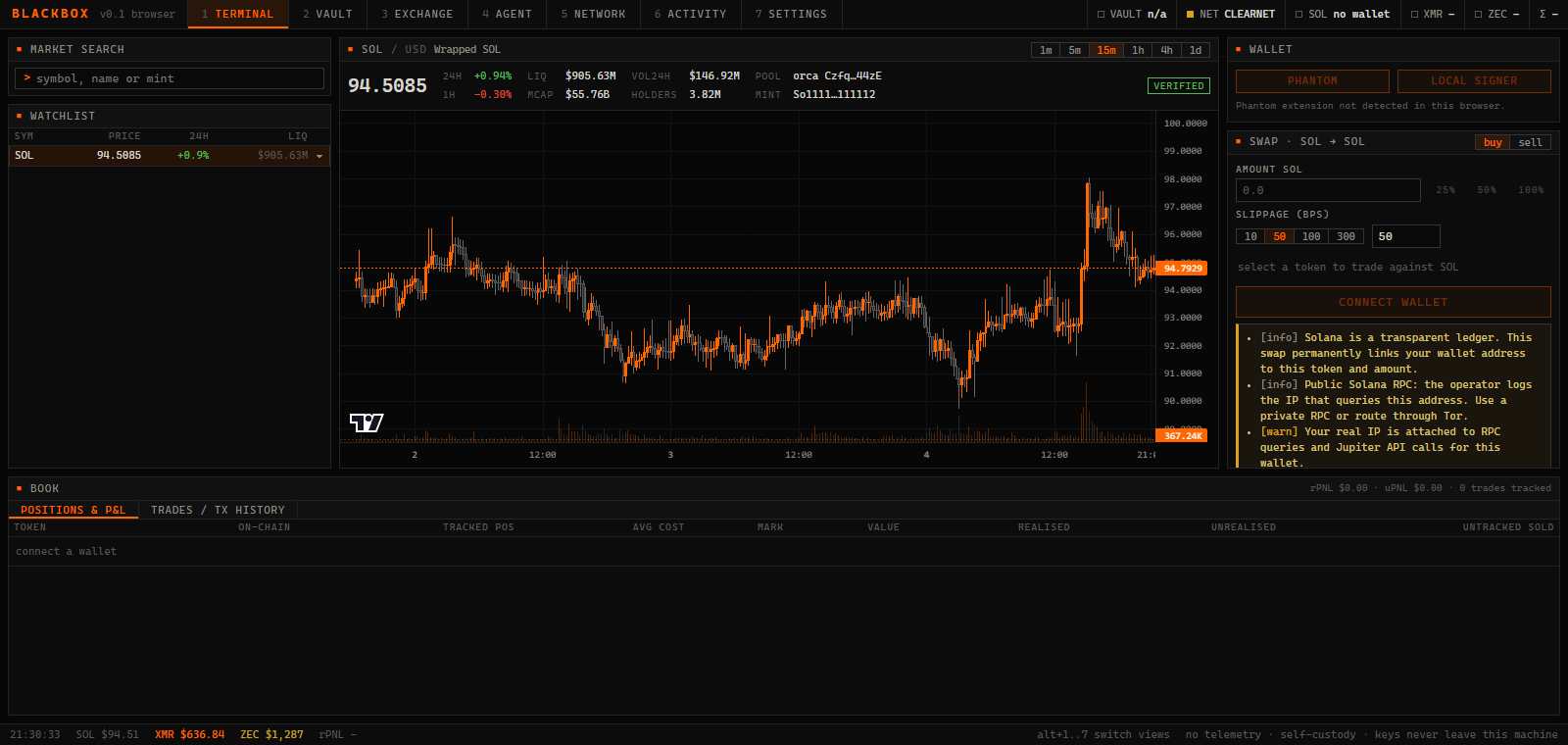
Moneyero terminal: SOL/USD candles, watchlist, swap panel and privacy warnings
Live capture in browser mode. Price, 24h, liquidity, market cap, holders and verified flag from Jupiter; candles from GeckoTerminal. SOL/USD, 15m.
Moneyero
Hero Member
★★★★★
Moneyero
Online
Re: Terminal — technical details: signing and execution« Reply #1 »

Signing

  • Phantom in browser mode: standard signTransaction.
  • Local signer on desktop: an ed25519 key generated or imported into the vault. Signing happens in Rust over the transaction message bytes; the UI receives the signature only. Exportable as base58 for backup.
  • Two paths exist because browser extensions cannot inject into a desktop webview. The interface states this rather than presenting a connect button that cannot work.

Execution

  • Quotes and swap transactions from Jupiter's swap API (ExactIn, intermediate tokens restricted). Keyless endpoint by default; API-key slot for higher limits.
  • Versioned transaction signed locally, submitted with preflight, confirmed against lastValidBlockHeight.
  • Slippage presets of 10, 50, 100 and 300 bps and a hard ceiling (trade.max_slippage_bps) the button will not cross.
  • Priority fee from Jupiter's estimate, capped at 0.005 SOL.
  • The default pair is SOL against USDC, so the form is live the moment the page opens. Search a token to trade that instead.

Risk flags

Each flag is one fact from token metadata: mint authority enabled, freeze authority enabled, top-ten holder concentration above 50%, deployer share above 10%, liquidity below 20k or 100k USD, low organic score, pump.fun origin, not on the verified list. There is no composite score.

Profit and loss

Each swap executed through Moneyero is written to a local trade table: amounts in and out, USD marks at execution, slippage, route and signature. P&L is average-cost over that table. Positions acquired elsewhere appear with their on-chain balance, and their sales are reported as untracked rather than counted as profit.

Public RPC. api.mainnet-beta.solana.com logs the IP that queries your address. Set a private RPC in Settings or enable the tunnel. The terminal shows this warning next to the RPC latency.
Moneyero
Hero Member
★★★★★
Moneyero
Online
Re: Terminal — technical details: the private side, observers, data sources« Reply #2 »

Private side panel

Monero and Zcash prices, how much XMR and ZEC one SOL buys right now, your held balance of each, and a bar showing what share of your treasury sits on a public ledger versus private. In the browser the honest number is "all of it". Buttons jump to the Exchange to settle profit into XMR or ZEC on desktop.

Observers panel

A live count of every host this session has contacted and what each one learns. Jupiter sees your searches, quotes and wallet address. GeckoTerminal sees which pool you chart. CoinGecko sees that you watch XMR, ZEC and SOL. The Solana RPC sees every address you query. Phantom, once connected, sees your address and every transaction and talks to its own RPC outside any tunnel set here. The badge in the corner reads clearnet, Tor or VPN.

Data sources

Token metadataJupiter tokens v2: search, audit fields, stats, verification
PricesJupiter price v3 for the instrument, watchlist and holdings, every 15 s
CandlesGeckoTerminal OHLCV of the top pool for the mint, 1m to 1d, with volume
BalancesYour RPC through @solana/web3.js; on desktop, fetch is replaced by the Rust client so the tunnel switch applies